

Part 1 of 5. Landing in code you've never seen is faster with AI tooling than it has ever been. Faster isn't the same as understanding, and the gap between the two has a shape.
There's a particular discomfort in opening a codebase you've never seen. You don't know where anything lives, which files matter, or what breaks if you touch the wrong thing, and it can tip over into negative feelings about the code or worse—imposter syndrome surrounding your own abilities.
With the ever-growing capabilities of AI tooling, though, that discomfort is now trivial to resolve: a model can explain a module in a minute or two. But speed and understanding are not the same thing. A fast explanation can leave you feeling oriented, when you've only read a summary you can't yet vouch for.
The solution for understanding is simple to state, but it does require work: let AI orient you, then verify what it told you against the real code. What's less obvious is how much the "verify" part changes at every point in the curve.
The curve everyone shares, and what it really is
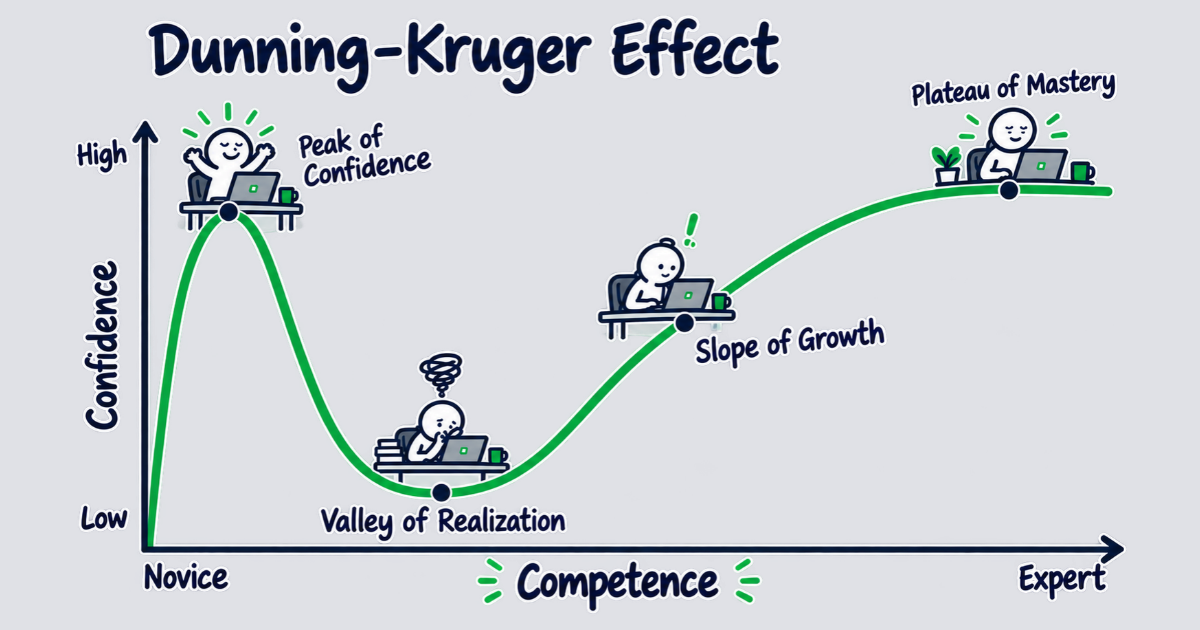
The curve at the top of this post is likely one you've seen in many variations. It's a line labeled "confidence" that shoots up to a Peak of Confidence, falls into a Valley of Realization, and climbs a Slope of Growth to a Plateau of Mastery. The shape traces back to a humorous 2014 drawing by Joseph Paris, and it's not a chart from the 1999 paper that gave the Dunning-Kruger effect its name.
What Kruger and Dunning measured was a snapshot across different people, not a journey. They tested undergraduates on grammar, logic and humor, split them into quartiles by score, and compared each group's average guess about its own standing with its real standing. Even the bottom group didn't think they were experts. They thought they were closer to average than they were.
However, the curve here is a story about a week I lived, on one ticket in a system I didn't know. The feelings on it are real: the ease, the wall, the slow climb to understanding. Each of those has research behind it, starting with how an understanding of code gets built in the first place.
Why understanding has a shape at all
Research on code comprehension says you don't absorb a codebase all at once. You build a model of it in layers. Pennington showed that when code is new to you, the first layer is control flow: what calls what, in what order. The data flow, the goals, and a full model of what the code is trying to accomplish come after.
What moves you through those layers is what Pirolli and Card called information scent: the cues, like function and file names, that tell you where to look next. A model follows the same scent. It reads files, runs grep, and follows references from one place to the next, which is part of what makes AI tooling a good fit for this work. In my experience, it also goes wrong in the same places you would. Where the names are opaque and the dependencies are tangled, the scent is weak for both of you, and a confident wrong guess compounds into more misunderstanding.
The layers and the weak scent, together, are what give learning a new codebase its shape. On day one you have the first layer and a fluent explanation of the rest, which feels like the whole thing. The valley is where you find out it wasn't. The climb is the other layers going in, one verified piece at a time.
The four phases, and what the AI does in each
This post series follows the four phases from above, one for each stretch of the curve: the peak, the valley, the slope, and the plateau. Each comes with its own feeling, and a different job for the AI. Each part starts with that feeling, then the research around it, then what to do with the tooling and how to verify it, and the pitfalls.
- Onboarding: "this is easy!" Heavy Claude use. The AI reads the code, explains it, and does most of the work. Part 2 is about why that feeling misleads you, and about the one thing you can do at the peak that decides what the valley costs.
- Learning: "this is impossible." Claude as a mentor, not a coder. The AI explains, paces and asks; you write the code. This is the slowest-feeling phase. Part 3 is about the tooling that stops and hands the next piece back to you.
- Baseline: "I'm starting to get this." Back to a normal pace, with Claude helping a lot. The AI does the heavy lifting again, and it's safe now, because you can check its output against a location you can open. Part 4 is about the verification loop, and about writing the verified model down so nobody pays for it twice.
- Expertise: "I've got this." Using Claude to shape the changes, while still working in the code directly to refine them. Part 5 is about what the research says expertise changes, and about the tooling that plans and designs without writing.
Orient quickly, then verify
The tooling has made the first part of understanding unfamiliar code genuinely fast, but that speed is the easy half of building a true understanding. The more difficult half is checking what the tooling told you against the real source, which is what separates knowing the code from feeling like you do.
Part 2 starts at the peak and looks at why that first afternoon with an AI tool feels like understanding when it isn't, and how to use the peak without paying for it later.
River Lynn Bailey is a Senior Software Consultant at Test Double, and has extensive experience in AI coding tools and delivery, built on a career of delivering quality software solutions.