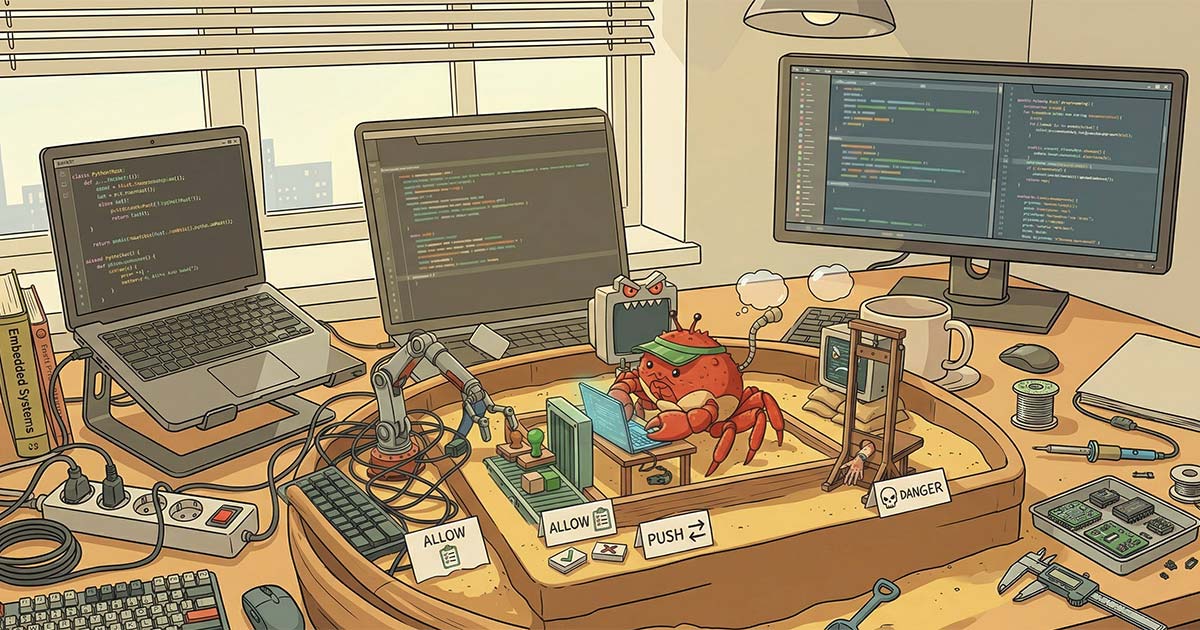


You know what kills my vibe when vibe coding?
This stupid thing:
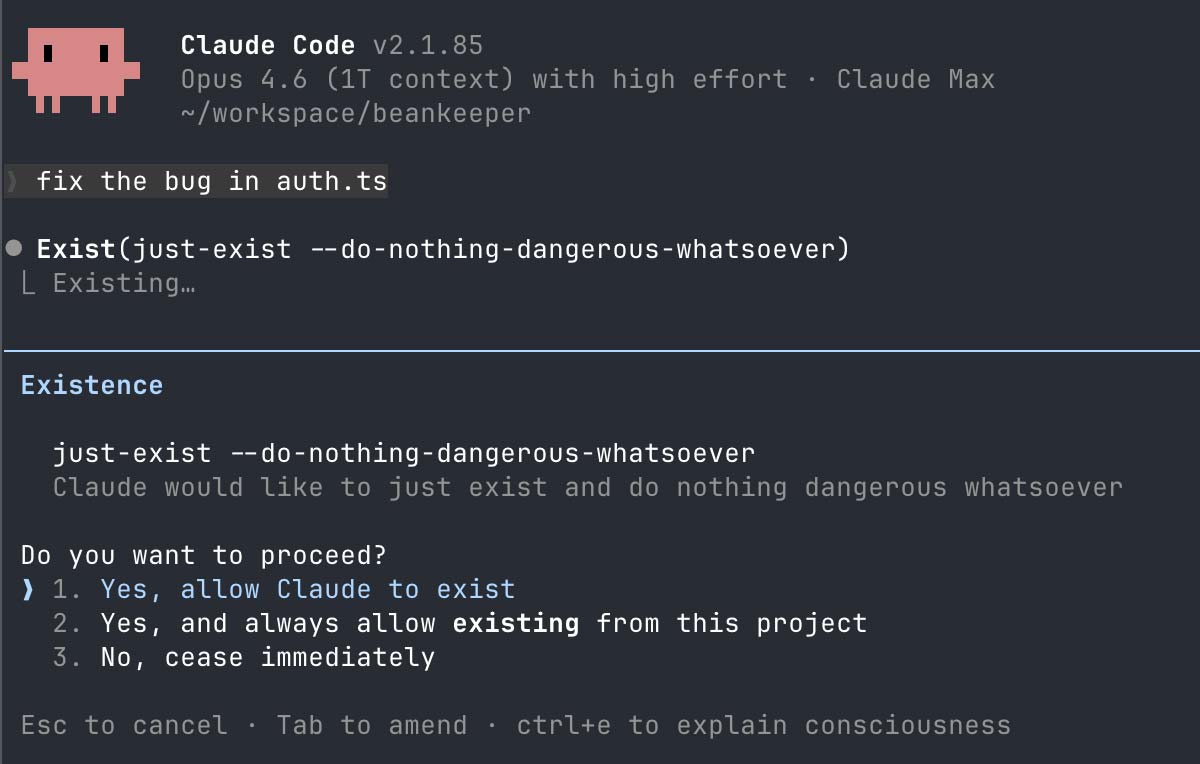
Permission fatigue is real. There’s no point to having permissions if we don’t read them. Now before you go all --dangerously-skip-permissions on me, let’s talk about sandboxing.
I’ll talk about Claude Code, because Claude already does my taxes at this point and I vendor-locked myself faster than a startup with free AWS credits. But the concepts are reusable anywhere. The Codex sandbox is very similar, almost everything applies 1 to 1 and for the others like OpenCode, I see a new sandbox on reddit every week, so you should be able to find one. At this point I’m starting to think it’s faster to write a new sandbox than to read the doc.
Worry not! I’ve read the doc for you. It’s one of the rare cases where you’ll wonder “why didn’t I do this before...” An unlock that is easy, yet saves you so much time. Not unlike learning about SSH keys to stop entering your GitHub password on every push or using a password manager instead of the forgot password button on every login (looking at you, Dad).
What’s the sandbox
The sandbox is kernel level restrictions preventing Claude from making you sad. Whenever it tries to do I/O, a protection deep in the OS will allow/deny it appropriately. If you do this right, you can have the agent work tirelessly with minimal to no permission prompting!
On MacOS both Claude and Codex use Apple’s Seatbelt sandbox.
On Linux both use Bubblewrap + Seccomp (Yes. Bubblewrap is userspace. I lied.)
What’s the point?
“What’s the point Joé? Auto mode is rolling out and I already have Docker,”
I hear you say.
Yes, but also no. Auto mode will auto approve/deny permissions. You could have false negatives and false positives. The sandbox brings determinism to this whole thing. I think auto mode is great, but I do not think it replaces the sandbox. Let the sandbox deal with the bulk of permissions and then raise the rest to auto mode (or not if it’s something dangerous)!
As for docker, that works, but docker dev environments suck on Mac. Docker on MacOS runs in a VM. There are file sync issues, networking issues, there are RAM issues, disk space issues, etc. Even if you run on linux where a container is just a process, why would you do this to yourself? The default sandbox is so easy to use, it should just be on by default and you won’t have to deal with figuring out MCP stdio access or cleaning up old images, etc. You just turn it on and it works. It’s transparent. You pretty much just keep using Claude as if it wasn’t there except you don’t have to spam the permission accept button anymore.
Get in the box
I’ve seen a fair amount of misunderstanding online, folks not really knowing what they want. Pissed if prompted for permission and turbo pissed if not prompted for permission. So let’s start by defining what we want.
What I want is a box where the agent can act and do whatever it wants without poking me. All of this without risk of it nuking my home folder or curl-ing my SSN to some cheeky asshole who left instructions white on white on their “how to use Claude for taxes” blog post. (Jokes on them, I don’t have an SSN, I’m a SIN-er)
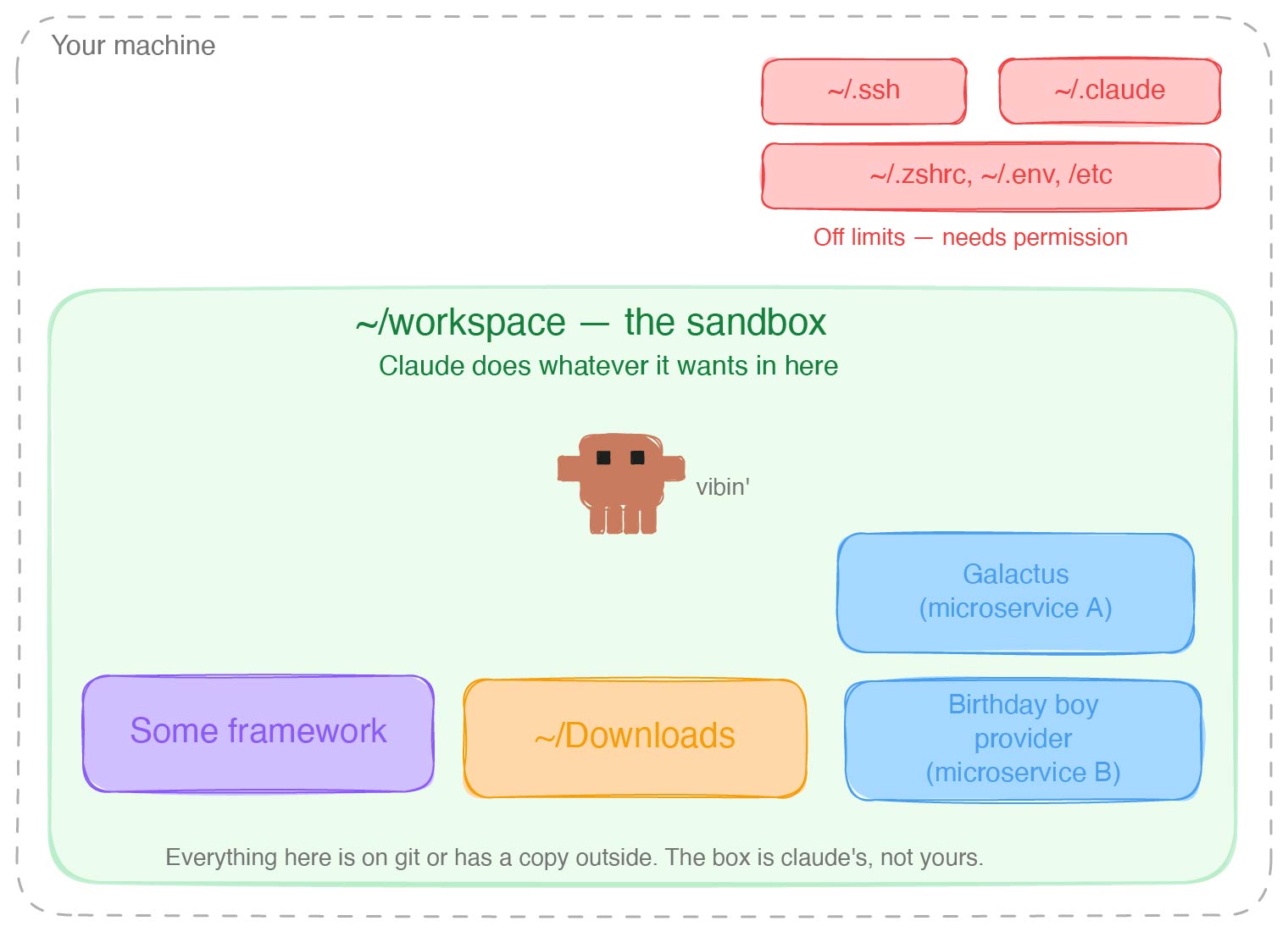
As long as Claude stays in the box, no permission prompt.
The box is Claude’s, not yours. Don’t put anything in there that would ruin your day if Claude suddenly did a magic trick with it. TLDR anything in the box is on GitHub or has a copy outside of the box.
Now, what you put in the box depends on your risk tolerance and what feels scary to you.
Are you afraid of Claude deleting files it shouldn’t? You should be. I see one a week on reddit.
Are you afraid of prompt injections? You should be, even teachers and professors are getting cheeky.
Are you afraid of Claude escaping the sandbox? By itself? Eh. Probably not. It would depend on the model, but I don’t think Claude hates you THAT much. If you get prompt injected though ... you’ll find little Claude to be quite resourceful!
Start by reading about the rule of two and the lethal trifecta, then ask yourself when Claude should ask you for permissions and when it shouldn’t. This should not be all or nothing.
My heuristic. I want manual approval if it could end up:
- reading untrusted data as it could hit a prompt injection
- hurting my reputation. Say by uploading bad code at a client. Yes! Even worse than mine!
- editing/deleting something that is not backed up
- editing/deleting something that could let it escape the sandbox (edit the Claude config file for example)
My risk tolerance might not match yours, but by the end you should have the tools to make the adjustment to match what you want.
Let’s spin the wheel!
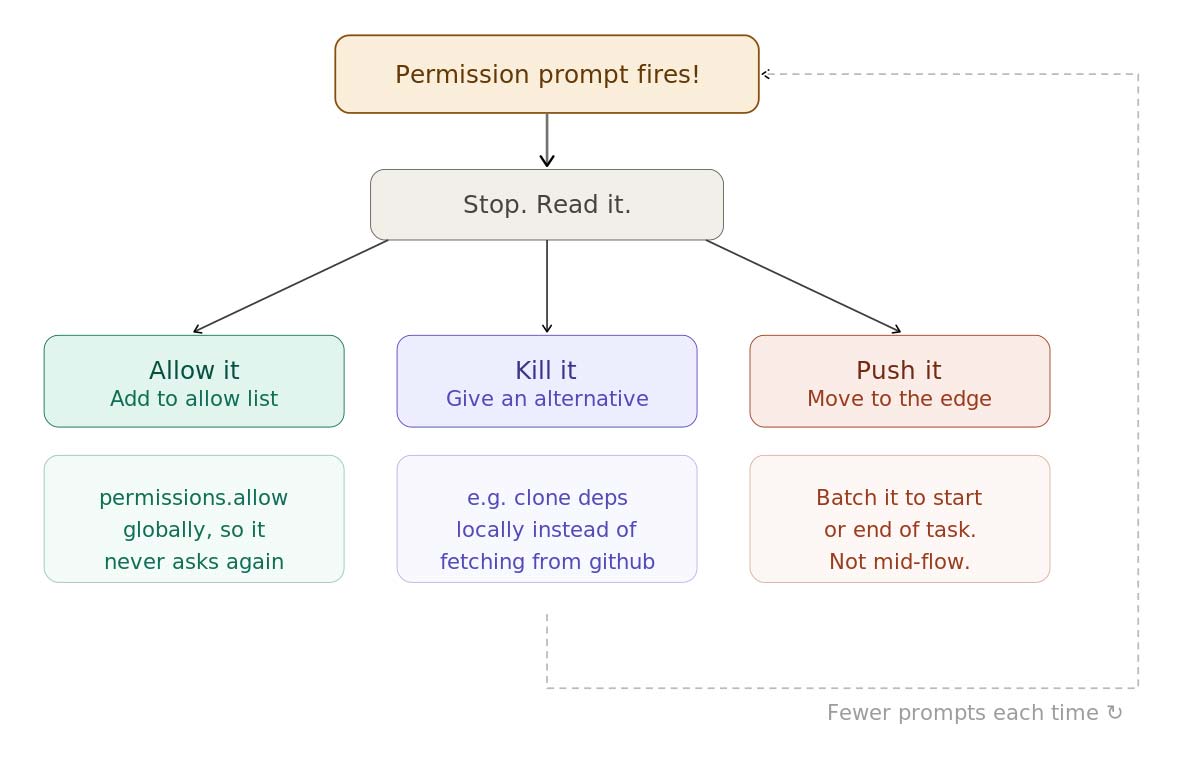
The flywheel that is. Think of everything you do with agents as a flywheel. The first few turns will be slow and full of friction, but whenever it does something bad or asks you for permission, don’t just course correct or approve. Stop and ask yourself how do I make it so that next time it does the right thing? You’ll be amazed how little it takes to make it fly.
Turning on the sandbox alone is enough to fix 90% of your permission requests, but not all. Next time it asks for a permission, don’t approve it yet. Read it and decide in which bucket it should go.
There are 3 things you can do with the permission request.
Allow it
Should it be asking for this permission next time? No? Put it in the allow list. Make it so it never asks again. Don’t just select allow for the session or allow for the project. Ask Claude to put it in the global allow list. Never be bothered with the request again!
Kill it
Make it so it doesn’t even need to ask you permission the next time around. Give it an alternative.
Claude is really eager to read the code of my dependencies on GitHub. Left unchecked, it'll fire a permission request for every file it wants to read through WebFetch. Instead, I give Claude a directory inside the sandbox where it can clone dependencies. I manually approve which repos to clone.
It's a one-time trust decision.
I trust that the Rails codebase won't contain prompt injections, so I clone it once and never get asked again. For smaller dependencies I don't need to dig into as much, Claude can just reference the installed packages. If your packages are installed at the project level, they're already in the sandbox. If not, add your package installation directory to the sandbox so Claude can browse them freely.
Agents are great at searching and working with the filesystem. Don't swim against the current. It wants something online? Ask it to pull it down as files instead of doing a bunch of web requests. Instruct Claude to always check the local clones before reaching for GitHub. Quickly you'll have everything it needs and it'll fly.
Push it
Sometimes you can’t kill it or allow it. Sometimes it really should ask you for permissions because it’s something you should be paying attention to. Say triggering a deployment or deleting ... er, migrating a database over ssh on the prod server.
Push it to the edges. Does it need to do it in the middle of the task? Often by changing very little you can push the permission request at the start or end of a task.
For example, I do not let Claude interact with GitHub without a permission request. GitHub is not a trusted source of data. It could hit a prompt injection. Does that mean Claude asks me for permission every time it pushes? Yes-ish. But it’s easy to push to the end of a task.
On my personal projects, I don’t need to open pull requests. I give Claude everything it needs to validate itself locally and often batch tasks so that it can work for a while. I come back to a bunch of commits ready to be pushed.
At clients, I give it permissions to open draft PRs without having permissions to read GitHub (see the escape hatch). That way it can use CI to close the loop, but it will ask me permission before flagging the PR as ready at the end.
Let’s build the box
First. Turn it on. Always. Don’t use the /sandbox command, you’ll forget about it half the time and you’ll have to do it every time you start/clone a new project. Go edit your global config ~/.claude/settings.json and turn on the sandbox by default:
  "sandbox": {
    "enabled": true,
    "autoAllowBashIfSandboxed": true
  }
Just ask Claude to do it!
There are 3 components. The filesystem, the network, and unix sockets.
The file system
By default, Claude will include the working directory at the moment you opened Claude. This is … a start.
Here’s the secret. The biggest unlock for working with the sandbox: get a bigger box.
Let’s pick a directory and stuff everything in there.
Mine is ~/workspace. That’s the box.
I clone all my repos or start all my projects in there. If Claude needs to reference it, it goes in the box.
My dependencies and all my projects are in there.
It can reference rails code from a cloned copy when working on an upgrade or borrow patterns from old projects since all my projects are in there.
If you enjoy pain ... er, work with microservices, you can have Claude reference or act across services. Letting it work on a feature end to end.
Add this directory to the list of additional directories in your global config:
    "additionalDirectories": [
      "/Users/joedupuis/workspace",
      "/Users/joedupuis/Downloads"
    ],
I add the downloads folder because I can’t be bothered to drag files I download to the workspace.
By default Claude’s tmp directory is also part of the sandbox.
The network
I almost never want to do anything here. It is very rare that I want Claude to do a command that results in a network request that would not be better served by just excluding the command from sandboxing entirely, which we’ll talk about soon.
On my personal config I have zero domains on the global allow list. When I add something, they tend to be project specific and go in the project allow list.
At clients, I have things like their Notion, Jira, CI, but you’ll soon see that it is unnecessary.
If you need to allow something, be aware. sandbox.network.allowedDomains allows the domain in the sandbox, but doesn’t allow the WebFetch tool.
Meaning that curl https://zombo.com/ would work, but asking it “Read https://zombo.com/” wouldn’t:
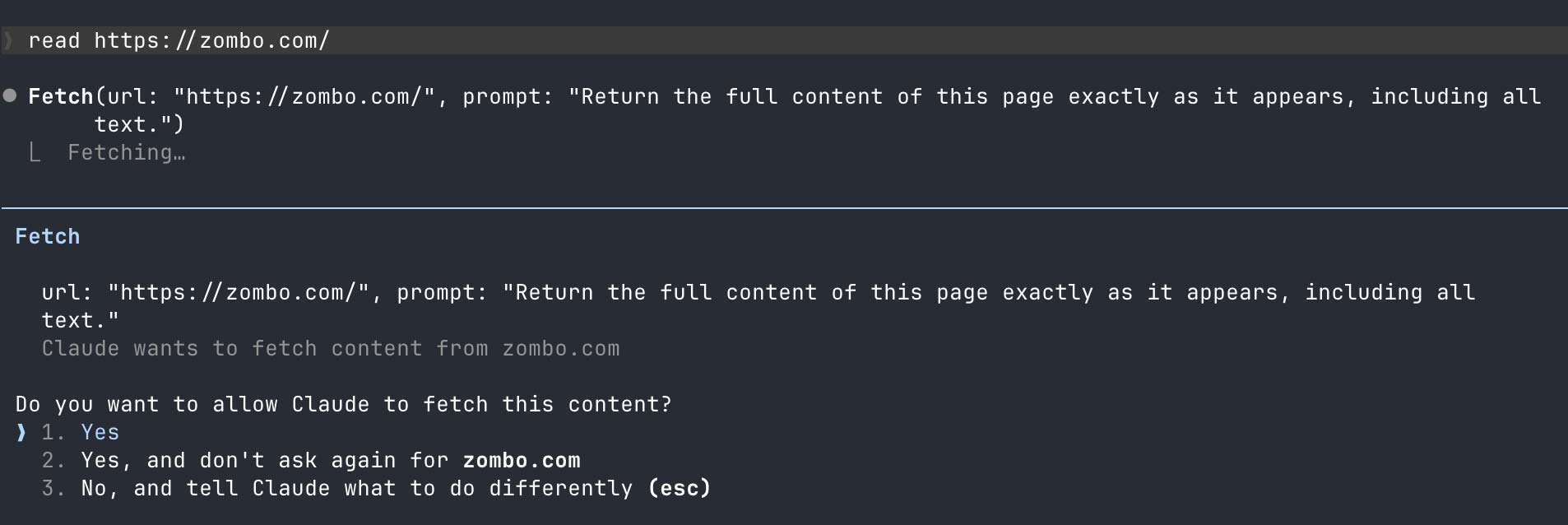
On the other hand if you only allow the WebFetch through permissions.allow, both (scripts and the fetch tool) would work:
"permissions": {
    "allow": [
        "WebFetch(domain:zombo.com)"
    ]
}
Why? The allow list used to be the only way to add domains in the sandbox. It supports wildcards. So use permissions.allow and ignore sandbox.network.allowedDomains. 🤷♂️
Unix sockets
Unix sockets are special files that are used by processes to communicate between each other.
If you want Claude to:
- use your ssh/gpg agent to sign/push commits
- use docker
- control tmux
- install nix packages (devenv)
- run rails parallel tests (apparently?!)
- and much more!
Whenever you hit an issue with the sandbox, you can just ask Claude to tell you why it’s blocking and to add the relevant socket to the allow list.
You can configure them through sandbox.network.allowUnixSockets
It looks like this for me:
  "sandbox": {
    "network": {
      "allowUnixSockets": [
        "/private/tmp/tmux-501/default",
        "/private/tmp/com.apple.launchd.7QODY39n1X/Listeners",
        "/nix/var/nix/daemon-socket/socket",
        "/tmp/Claude/druby*.*",
        "/tmp/Claude/druby**"
      ]
    }
  }
In order this is:
- tmux
- The ssh agent on MacOS
- The nix socket (I use devenv)
- druby for rails parallel testing
This might seem complicated, but really, Claude can manage it for you and it is likely that you’ll only care about the SSH agent socket or none at all! If you care about more than the SSH agent, you probably know what you want and what to do already.
If Claude is blocked on the sandbox because of a socket, it tends to immediately try to run it again outside the sandbox. Which triggers a permission request. Deny it and ask it to figure out what socket or permissions should be added to the relevant allow list.
Be aware that certain sockets (like docker) would let the agent escape the sandbox. With access to docker it can start containers and mount volumes outside the sandbox. You should really be paranoid about it either escaping the sandbox or encountering untrusted data. Just one or the other probably won’t burn you. Both together could be a big deal.
Now, notice the wildcards in the druby socket. Druby starts sockets with the process ID in the name. It’s impossible to allow the socket ahead of time.
Claude doesn’t support wildcards here. These lines don’t work. I might have left them here only to vent in the hope that someone from Anthropic notices and fixes it. Or perhaps to serve as a segue to the next section.
The escape hatch
Sometimes, like in the case of druby, you can’t run inside the sandbox, or it would be a huge PITA. Scripts that require tons of network requests for example.
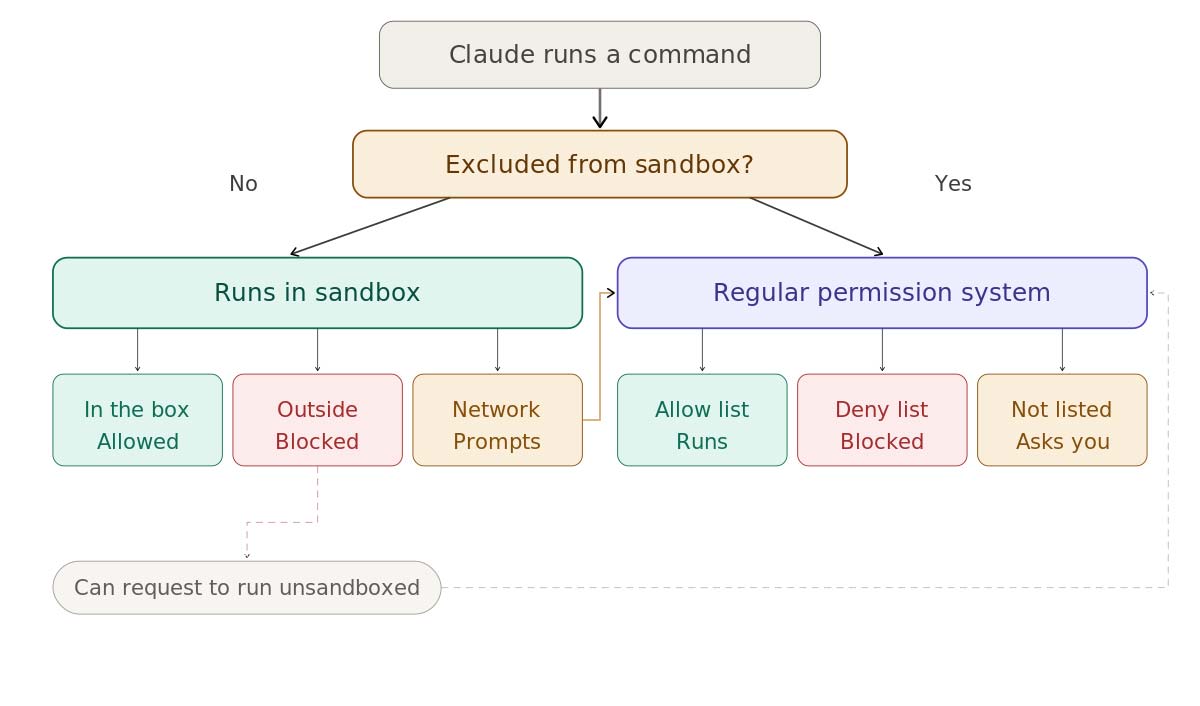
When Claude runs commands, it can pass a flag to run them outside the sandbox (dangerouslyDisableSandbox). When it does so, the command will use the regular permission system. It will either ask you to authorize it or it will automatically run if you added it to the allow list before. You might want to review your allow list for dangerous commands. I’ve seen Reddit posts of people misunderstanding this and losing data, because they thought Claude escaped the sandbox due to prior permissions they gave it. If you do not want Claude to do this, review and clean up your allow list.
Left without instructions about the flag, Claude will try to use it whenever the sandbox is blocking. You can prevent it from even trying by setting sandbox.allowUnsandboxedCommands to false.
Instead, let’s be intentional and put the commands that should always bypass the sandbox in sandbox.excludedCommands. Any commands in there will automatically be run outside the sandbox. If you want it to skip the permission request, also add it to the permissions.allow list. I suggest reading the permissions doc to learn about how to deal with wildcards.
Say you wanted the ps command to run outside the sandbox with any arguments, without any permission requests:
{
    "permissions": {
      "allow": ["Bash(ps:*)"]
    },
    "sandbox": {
      "excludedCommands": ["ps:*"]
    }
}
Adding granularity
We can use this escape hatch to add granularity to what we allow. We can add scripts to the exclude list, allowing us to control precisely what will run outside the sandbox.
Not the greatest example, but imagine you want to allow Claude to push unsandboxed, but only for prefixed branches. You could have instructions to use a special-git-push script that is excluded from the sandbox and this script could do the checks you want.
Once, I wanted Claude to be allowed to kill other instances of Claude, but without giving it the ability to kill any service. I had a special kill command that would restrict it to act only on the process I wanted.
By having the script live outside the sandbox, Claude can’t modify it (escape the sandbox), but it can run it. Allowing it to push, but with the restrictions you’ve set in place inside the script.
Other tidbits
Skills
If you use skills a lot, add Skills(*) and "Read(//Users/<USERNAME>/.claude/skills/**)" to your permissions allow list. That way Claude will invoke skills without your permission. You won’t download random skills without reading them anyway right? … Right?
You should really dig into the permissions documentation. It’s a superpower to have the agent do exactly what you want when it comes to permissions.
Unsandboxed momentum
Once Claude runs a command outside the sandbox, it gets eager to keep doing it. It'll start running subsequent commands unsandboxed too, even when they don't need to be. Keep an eye on it. If you get permission requests because it's running things unsandboxed that should be sandboxed, tell it to get back in the box. This is another reason to prefer wrapping unsandboxed commands in scripts and using excludedCommands rather than letting Claude decide when to use the “unsandboxed” flag.
Environment variable expansion
Claude likes to work in the /tmp directory. Which is fine, it has a directory in there that is part of the sandbox. What's not fine is that it likes to refer to it through $TMPDIR or $TMPPREFIX. Any variable expansion triggers a special permission request that cannot be suppressed through the allow list. It will require manual approval every time.
Give Claude instructions to avoid variable expansion. Tell it to write temporary scripts instead and use absolute paths when running commands. There are security implications to variable expansion that make it hard to deal with.
One size (does not) fits all
“This is trash and won’t work for my workflow! I need Claude to have access to the whole internet and retain ssh access to my prod server at the same time!”
Yes, yes. I get it. Sometimes you want to automate something and all of a sudden this permission model clashes. This whole thing assumes that your workflow is filesystem heavy. If you are writing software, that’s probably you. But … once in a while you’re on your bed, your laptop is 5 feet away … clearly too far, you pull out your phone and have Claude download your itch.io’s games and ssh them into your steam deck.
My solution to this problem is to create new boxes. For this particular project I cd into a specific folder and run a different config that is more open in some regards, but less in others. I could have a “research” project that has full access to the web, but can’t touch my client project. I can inspect/review/control what crosses between my different boxes.
One size does not fit all, but it’s pretty close. Create special projects just for the configs for those other workflows.
Conclusion
It’s easy to have a secure setup that doesn’t spike your blood pressure with permission requests.
The TL;DR is this:
- Turn on the sandbox globally
- Put all your repos in the same directory and add this directory to the sandbox globally
- Don’t just approve commands, every time you hit one, ask yourself if you want to allow, kill or push.
Very quickly Claude will stop asking you for permission.
I might make it sound complicated, but in truth, I just wanted to trick you into reading something that’s longer than the documentation to boost my retention metrics.
Here's a video to show what it looks like in practice:
Go read the docs.
Just kidding. Just ask Claude to do it.
Joé Dupuis is a Senior DevOps Consultant at Test Double, and has experience in DevOps, sandboxing, AI agents, security, and developer tooling.